


The use of electronic health record (EHR) systems in mental health practices to store, organize, and analyze healthcare data brings many advantages over paper-based record-keeping. Once the EHR implementation process is complete, the software should make practice management easier, clinical documentation more efficient, and can even improve things like cash flow and KPI tracking.
However, establishing the system at your mental health practice isn’t an overnight process. EHR implementation will likely require time, careful planning, collaboration, and coordination between various parties.
But the process needn’t be painful or drawn out. With a clear to-do list and some best practices under your belt, you can have your EHR up and running in a reasonable timeframe.
Benefits of an EHR
If you’re wondering whether you need an EHR (and all the work that comes with implementation), it’s worth considering the benefits such software can bring:
- Increases admin efficiency. EHR systems can help you complete the daily tasks of treatment and practice management more quickly and easily.
- Supports measurement-based care. Some EHRs for mental health providers are designed for measurement-based care and can help you utilize and score symptom rating scales faster.
- Tracks your KPIs. Want to know about provider productivity, referral sources, retention rates, and patient outcomes? The right system can track this and more.
- Organized billing and payments. A user-friendly billing system in your EHR can make it easier to stay on top of finances.
- Makes telehealth easier. Telehealth is increasingly important, and a system with telehealth solutions will give you a leg up on the competition.
- Keeps data secure. HIPAA-compliant software keeps your data safer than if it were locked in a physical filing cabinet.
- Facilitates document sharing. Whether sharing between treating clinicians or between provider and patient, an EHR keeps everyone on the same page with easy digital documents and forms.
- Better patient and provider experience. All of these benefits add up to a better experience for your patients and your providers.
For practices currently using a legacy system, upgrading to a modern behavioral health EHR can also mean consolidating telehealth, billing, documentation, and patient engagement tools into one connected platform. When done correctly, switching EHRs can reduce manual workflows, eliminate redundant systems, and create a foundation for long-term growth—without extended downtime.
What Should I Expect From New EHR Systems?
Healthcare tech has come a long way from the days of bulky desktops and copy machines. The right EHR solution should make every step of treatment and practice management more convenient.
Many modern EHRs have strong integration features so you can easily fit them around other solutions you might already be using. Plus, all-in-one mental health EHRs are more popular than ever, attempting to cover all the bases of practice management on one system.
A modern EHR should offer user-friendly features to patients and providers. These include convenient features like a robust patient portal, comprehensive CPT code library for billing, integrated credit card processing, easy documentation capabilities, and straightforward billing features.
Many of these items were once seen as “nice-to-haves,” but as EHRs have grown in popularity, these features are seen as basic expectations. You want to purchase a software that stays ahead of the curve, not behind it.
How to Plan for EHR Implementation
You can’t simply pick a new EHR system and have it up and running the next day. For the best chance of smooth EHR implementation, careful planning is in order.
Plan With People in Mind
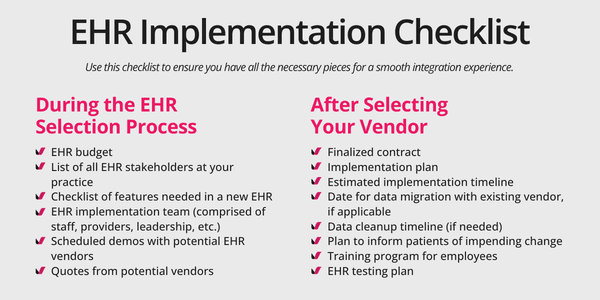
The first thing you must do is gain an understanding of who has a “stake” in the EHR solution at your practice, and find a system that meets the needs of all parties involved. If your clinicians will interact with the EHR for scheduling, treatment, or records purposes, they have a stake in which system you pick. Staff members will likely conduct much of their daily work on the system. Your patients have a stake, as the system will (hopefully) facilitate many of their interactions with your practice. If you are a large organization, your top leaders may want to be involved in the decision as well.
Figure out how a new EHR could best support each type of constituent. What functionalities do clinicians and staff need to do their jobs better? What do patients expect? What is upper management hoping to achieve by getting a new system? Keep these needs in mind as you evaluate the capabilities of different software products.
Planning the Budget
The early stages of implementation planning should also include budgeting. You will likely need to pay for the cost of the EHR itself and any potential data migration from an old system. Don’t forget the cost in time; integration, data migration, and staff training require a time commitment from your employees.
When you’ve found a company you’re seriously considering, request a written quote that breaks down the final price by line item. It’s also important to schedule a demonstration of the product by a knowledgeable product representative before you make any decisions.
A few other questions to address early in the planning process:
- Are the EHR systems you’re considering HIPAA compliant?
- If you already use an EHR, when does your contracted term with that company end?
- How will your former vendor assist with the EHR migration process?
- How much support will the new EHR company deliver in training your staff and troubleshooting problems?
- Are there any features, such as a patient portal, that you’ll want to “market” to your patients ahead of the launch?
How Long Does It Take to Switch EHRs?
There is no firm answer to this question. The timeline for implementation is dependent on many factors, including:
- Where your data is currently stored (electronic or paper)
- How quickly your existing EHR company can help you export data
- Whether you have a lot of “data cleanup” to do before it goes into the new system
- How long staff training for the new system will take
- How many, if any, customizations you’ll need built into your new system
- How much interruption to your practice workflow you can sustain
For most behavioral health practices, an EHR implementation timeline ranges from several weeks to a few months, depending on size and complexity. Solo practices may move faster, while multi-site organizations operating across multiple time zones may require more coordination around scheduling, training, and data migration.
An experienced vendor should be able to implement an all-in-one telehealth EHR across multiple time zones without interrupting patient care. Clear project management, structured onboarding, and phased rollouts help ensure you can switch EHRs without significant downtime.
Your new vendor will have information on a typical timeline based on their work with other organizations similar in size and scope to yours. All the same, it’s important to remain flexible, as many things can make the timeline longer than anticipated.
What Are the Steps to EHR Implementation?
Once you’ve chosen a system, it’s time to proceed with actual implementation. Here are the common steps you’ll need to take.
- Agree on your contract with the new company. As mentioned earlier, make sure you understand the line item breakdown of any and all costs, including implementation fees.
- Create a rough timeline. It’s hard to say precisely how long an implementation will take, as many variables can affect it. The software company should be able to give you a ballpark estimate.
- Create an implementation team at your practice to partner with your new vendor. Every type of user (clinician, staff, upper management) should have a representative on the team if possible. Make sure that every important implementation task has an assigned “owner.”
- Create an implementation plan with your team and your vendor to decide how the implementation will be done. What steps will you take, and in what order? What problems do you anticipate, and how will you respond to them?
- Determine whether patient appointments will need to be rescheduled to accommodate the activities of implementation and training.
- Alert patients to the impending change, particularly if the new system will significantly change their interaction with your practice, such as a new patient portal, new payment system, or new way to contact the practice.
- Integration. The EHR you’ve just purchased will need to be connected to other software systems that you intend to keep using. For example, if you already have systems in place to analyze your data, manage your billing, or conduct telehealth sessions, your new EHR will need to “talk” to these systems to promote a smooth workflow. If you are purchasing an all-in-one EHR solution to streamline your processes onto one system, you will be able to skip the integration step.
- Data migration. If you’re migratingdata from a legacy system to a modern behavioral health EHR, you will need to establish an archiving strategy, make sure your data is clean, and work closely with both vendors to transfer critical information securely.
- Training. You’ll want to be clear up front regarding how much training your new EHR provider will conduct with your team. It will be up to you to decide who is involved in training, and to what extent. Some staff members may only need training on their particular workflow in the new system, while others may want to become superusers who understand the system as a whole. They may even be able to facilitate ongoing training. Upper-level management may wish to be involved in training as well.
- Testing the new EHR. Testing ensures that all parts of the EHR are working as expected and that the features you need are present. You may wish to reference a standard EHR testing plan, or collaborate with your new software company to create one yourself.
What Data Needs to Move When Switching EHRs?
Most practices prioritize:
- Patient demographics and contact information
- Diagnosis Codes
- Insurance details
- Patient notes (when feasible)
How to Migrate Notes From One EHR to Another
The timeline for implementing a new EHR often depends on how quickly patient data can be extracted from your current system. Records should be exported in a standardized, structured format so they can be accurately mapped into the new platform. After extraction, the data must be validated to maintain accuracy and integrity before and after it is imported. Coordinate with your current vendor early to establish a migration schedule, allowing sufficient time for system access and staff training before go-live.
Congratulations, your new EHR is established. Whether you’re implementing your first system or searching for the best behavioral health EHR to switch to, a thoughtful implementation process ensures you’re positioned for long-term clinical, operational, and financial success.